
Skip to content

Follow the decision behind the number.

A pricing engine is a decision system. It selects an eligible base entry, applies matching rules in order, and produces a price with an explanation. In RenderDraw, Pricing Studio makes that process visible through price-book authoring, validation, simulation, publication, and recent decision traces.

RenderDraw product teamReviewed October 10, 2026

Choose the base entry

Price entries identify a SKU, currency, unit of measure, price group, quantity range, and effective window. Use those fields to express eligibility. A quantity break changes the base unit price when the requested quantity falls inside its defined range.

Apply rules in a deliberate order

A rule has eligibility, conditions, a price action, priority, and stacking behavior. A quantity break and a percentage adjustment are different decisions. Define the sequence so a customer-group adjustment operates on the intended base, rather than treating every discount as interchangeable.
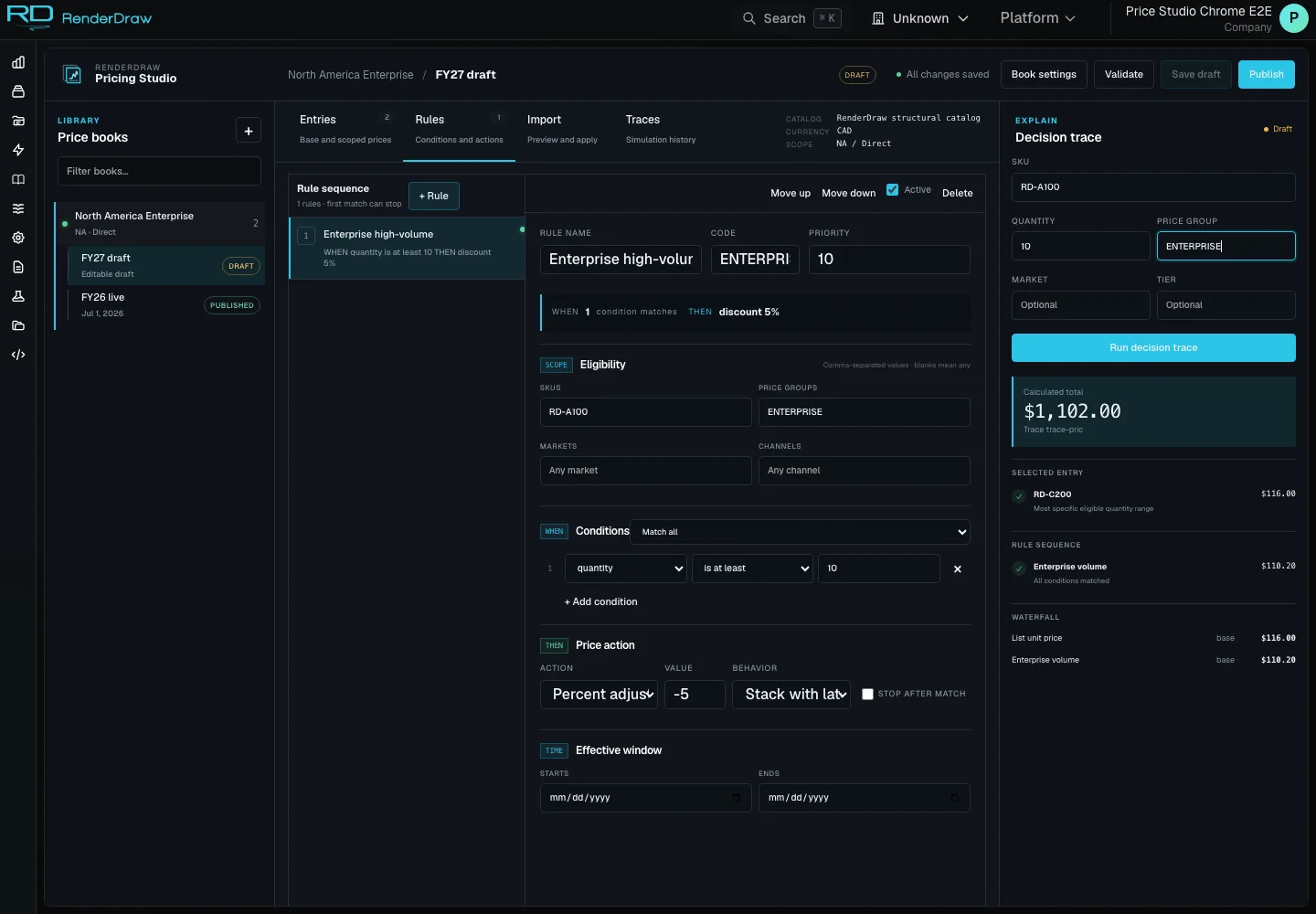
Actual Pricing Studio rules and decision trace capture with example data
Actual RD Platform capture with example account data.

Read the price waterfall

The waterfall follows the price through each adjustment. Review the initial unit price, changes from matching rules, the final unit amount, and quantity extension. A decision trace also explains candidate eligibility and why a particular entry or rule matched.

Import values without hiding assumptions

Preview spreadsheet mapping before applying rows. Validate currency, units, amounts, ranges, and dates. Excel import evaluates supported workbook formulas into values; unsupported or erroneous formulas surface diagnostics instead of becoming silent price entries.

Separate a draft from a published version

Use a draft for authoring and simulation. Validate it before publication. Create a revision for later changes so the authoring workflow has an explicit version context. Verify downstream quote and proposal behavior separately in the configured integration.

Confirm the source of truth

Internal authority uses RenderDraw pricing. External authority uses the selected provider. Hybrid, Fallback, and Shadow express combined, recovery, or comparison policies. A named policy alone is not an implemented connector; confirm provider support and failure behavior for your deployment.

Configuration, pricing, and quoting

These are connected decisions with different responsibilities.

DecisionQuestion it answersOutput
ConfigurationWhat can this buyer select?Validated product state
PricingWhat price applies to this context?Unit price and explanation
QuotingWhat commercial offer is approved?Customer-facing offer
Try the example

Questions worth answering.

What is a CPQ pricing engine?

A CPQ pricing engine evaluates product and customer context against price entries and ordered rules to produce a unit price, an extended price, and an explanation. RenderDraw Pricing Studio provides price-book authoring, validation, simulation, publication, and a decision trace for that evaluation.

Can RenderDraw import spreadsheet price lists?

Pricing Studio supports CSV and Excel import preview and mapping. Excel formulas are evaluated to calculated values before import; the original formula is not stored as a row formula. Review diagnostics and apply eligible rows to the active draft before validation and publication.

How do quantity breaks and customer price groups work?

Price entries can be scoped by SKU, customer price group, currency, unit of measure, quantity range, and effective dates. A simulation checks candidate eligibility and applies ordered matching rules. The decision trace explains the selected entry, adjustments, final unit price, and extended total.

Can an external pricing system remain authoritative?

RenderDraw models Internal, External, Hybrid, Fallback, and Shadow authority modes. The selected policy identifies which system supplies authoritative prices and whether an internal fallback or comparison is appropriate. Provider support and downstream behavior depend on the configured connector; authority modes do not imply every provider is enabled.

Are the prices on this page RenderDraw subscription prices?

No. The interactive example uses an illustrative industrial product and sample USD price rules. RenderDraw platform pricing and implementation scope are separate. Use the platform pricing page or talk with RenderDraw about your catalogs, workflows, and integrations.

The connected journey

The price starts with the product.

Start with a valid configuration. Give its commercial context to the engine. Follow the result into your workflow.

Try configuring
  1. ProductUnderstand the choices
  2. ConfigurationResolve a valid selection
  3. PricingExplain the commercial result
  4. HandoffContinue the quote workflow