
Skip to content

From product knowledge to buyer confidence.

A useful product configuration journey starts with product knowledge and ends with a validated selection. RenderDraw separates product features and compatibility, the buyer-facing interface, visual interactions, and downstream commercial systems. That separation lets teams design guided selling while keeping the source of each product rule explicit.

RenderDraw product teamReviewed October 10, 2026

Model the choices buyers need to make

Start with product features, options, defaults, and compatibility constraints. A Product Feature Model can supply feature context to Configurator UI attributes. Separate what the buyer chooses from what the product model requires.

Build sections that match the decision

Create named sections, order them, and select the input renderer for each attribute. Add help text, section media, and non-input content where it clarifies a decision. Keep machine-readable attribute keys stable for submission.
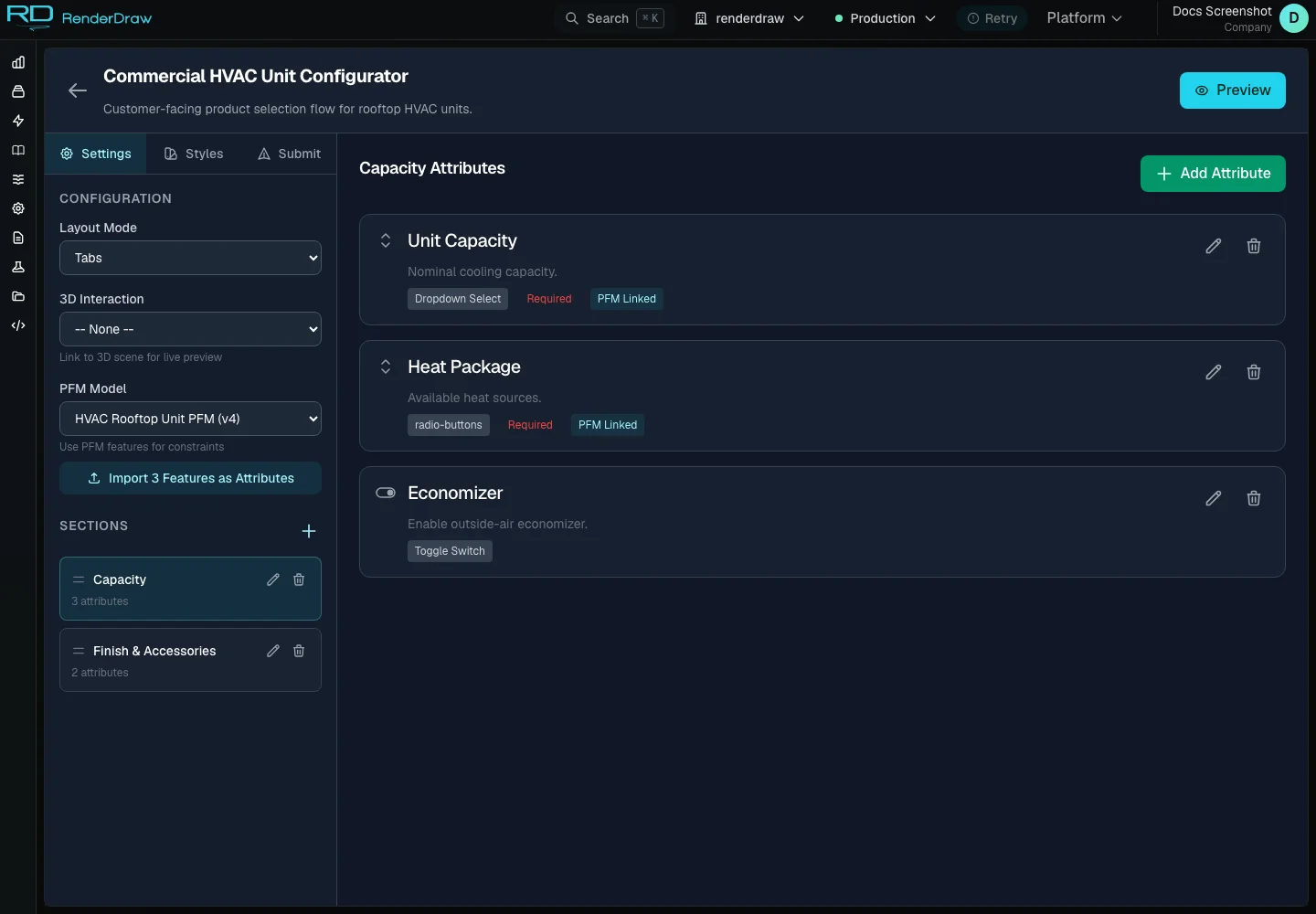
Actual Configurator UI builder capture with example data
Actual RD Platform capture with example account data.

Connect the visual experience

Link an optional 3D interaction to the configurator. Section-visible events and selected attributes can participate in the configured visual experience. The model, scene, and integration must be set up for the product you intend to sell.

Preview the buyer's actual path

Test sections, required labels, available options, and submission controls in the embed runtime. Review the selected accordion, tabs, wizard, single-panel, or floorplan layout. Check both a normal selection and an incompatible or incomplete selection.

Publish and validate the handoff

Confirm that the configurator reloads with a published status before sharing it. Configure completion copy, an optional redirect, and webhook settings. Server-side validation remains authoritative when a buyer submits; preserve their state when corrections are needed.

Decide where CPQ begins

Configuration captures a valid product selection. Pricing evaluates commercial context. Quoting packages approved commercial output. Native PFM rules and external CPQ rules have distinct owners; the right handoff depends on the selected connector and workflow.

Configuration, pricing, and quoting

These are connected decisions with different responsibilities.

DecisionQuestion it answersOutput
ConfigurationWhat can this buyer select?Validated product state
PricingWhat price applies to this context?Unit price and explanation
QuotingWhat commercial offer is approved?Customer-facing offer
Try the example

Questions worth answering.

What is a visual product configurator?

A visual product configurator guides a buyer through product choices while connecting those choices to a visual experience and compatibility rules. RenderDraw combines configurable sections and attributes, optional 3D interactions, Product Feature Models, runtime styling, and a validated submission handoff.

Can I embed a RenderDraw configurator on my website?

Yes. A published Configurator UI has an embed runtime. The same configuration definition supports accordion, tabs, wizard, single-panel, and floorplan layouts. Preview the runtime, confirm its published state, and configure submission behavior before sharing it with buyers.

Who owns product compatibility and pricing rules?

Configurator UI owns presentation and submission. A linked Product Feature Model owns native feature options and constraints. An external CPQ can own its product-session rules and commercial logic. Pricing Studio owns RenderDraw price books and evaluation. Select rule ownership for the intended interaction and integration.

What happens when a buyer submits a configuration?

The runtime sends the selected configuration for server-side validation. A successful response can show a product code and completion message, trigger an optional signed webhook, or redirect the buyer. Validation errors preserve the configuration so the buyer can correct it.

Is the interactive example connected to RD Platform?

This page runs a browser-based demonstration with illustrative product choices and prices. It does not create a platform configuration, publish a price book, or submit a quote. Actual configurators use your tenant, product definitions, rules, and configured downstream integrations.

The commercial handoff

Good choices deserve a clear next step.

Carry a validated selection into pricing, then into the configured quote or proposal workflow.

Explore pricing
  1. ProductUnderstand the choices
  2. ConfigurationResolve a valid selection
  3. PricingExplain the commercial result
  4. HandoffContinue the quote workflow