Downtobid alternatives, compared fairly.
Downtobid helps general contractors turn a plan set into trade packages and send personalized invitations to bid from their own email. It gives subcontractors a bid board for invites and deadlines. It is not a quantity takeoff tool. For a subcontractor, the next step after the invite is the takeoff and the price. Here is how those jobs fit.
Send one plan set. Free sample takeoff, no obligation.
- Invites vs takeoff
- For GCs
- For subcontractors

What each is built for.
This table separates the invitation stage from the estimating stage. The takeoff rows are options for work after the invite; they do not replace a GC’s invitation process. If you are choosing bid management, compare that category on the vendors’ own sites and verify the purchasing terms for your organization.
| Tool | Category | What it does | Who pays | Published price (as listed November 11, 2026) | Good fit |
|---|---|---|---|---|---|
| Downtobid | Bid management / ITBs | AI identifies trade packages and drafts scope notes; personalized ITBs from the GC’s email; sub bid board | GCs; subs submit bids free, with paid bid-board upgrades | GC from $149/month; sub leads bid board from $119/month; full bid management from $299/month | GCs sending invites; subs tracking invites and deadlines |
| Other bid-management platforms | Bid management | Not verified | Not verified | Not verified | Compare on each vendor’s site |
| Kreo | Takeoff + estimating | Manual or AI takeoff, depending on plan | Estimating teams | USD, from $100/user/month ($1,200/year), billed annually; Essential without AI | Subs choosing a takeoff and estimating suite |
| zzTakeoff | Cloud takeoff | Point-and-click takeoff with AI page setup | Estimating teams | Pro $49.99 USD/user/month | Subs wanting collaborative cloud takeoff |
| RenderDraw | AI takeoff to quote | AI proposes quantities; estimator reviews; pricing and visual CPQ | Estimating teams | Not published; book a demo | Subs turning reviewed AI takeoff into a quote |
Prices as listed on November 11, 2026; source links are in each published price cell. Prices change; confirm with each vendor. Not published means the checked vendor source does not state it; Not verified means we did not check it.
Skip the manual count
Upload one plan set and get a free sample takeoff. AI takeoff, estimator review, no CAD license needed.
Test on one of your own sets.
Begin by choosing which job you are evaluating: a GC sending invitations, a subcontractor organizing incoming opportunities or an estimator preparing quantities and a price. A useful trial has one of those goals. Measuring an estimating product against an invitation tool would leave the original purchasing question unanswered.
Pick a representative bid
Use an invitation and drawing set similar to the work you pursue. Decide whether you are checking invite organization or preparing the estimate. Keep the scope and due date visible so the test reflects the way a bid enters your desk.
Run it in each tool
For bid management, verify the invitation and tracking process with that vendor. For takeoff, use the same plan set in each measuring candidate. Time the estimating work separately from the work of organizing the opportunity.
Compare outputs
At the invitation stage, inspect the scope and trade-package descriptions. At the takeoff stage, compare counts, lengths and areas. Have the estimator check those quantities before you draw any conclusion about a price or a quote.
Check the handoff
Follow the opportunity from the received drawings through checked quantities and into pricing. Identify who owns each decision. Choose an invite platform for invitations and an estimating workflow for the priced bid you need to send.
From plan set to reviewed quantities.
Send one plan set
Upload the drawings and the scope you want tested.
AI proposes quantities
Counts, lengths and areas come back for review.
Estimator review
Your estimator accepts, corrects or rejects each item. Nothing is priced before approval.
Price reviewed rows
Reviewed quantities hand off to pricing.
Quote with CPQ
Build the quote from reviewed quantities in RenderDraw’s visual CPQ.
No code needed and no CAD license needed. Supported trades and files depend on your scope; confirm them in the free sample run.
What we checked (November 2026)
- Downtobid: the GC job. Its site describes reading plans to identify trade packages and draft scope notes, then sending personalized invitations from the GC’s own email. It says the GC reviews and edits before sending. That is invitation preparation, not a quantity takeoff claim. Vendor source
- Downtobid: the subcontractor job. The vendor describes a Bid Board with invites, deadlines and RFIs, a due-date calendar and team assignment. It says subcontractors can access planrooms and submit bids free, with paid bid-board and management options. Vendor source
- Downtobid: prices. The vendor lists starting prices for a GC organization, a subcontractor leads bid board and full bid management. These describe different purchases. Confirm which package applies before comparing their monthly amounts. Vendor source
- Other bid-management platforms. Their current functionality and prices are Not verified for this page. Compare them on each vendor’s site. RenderDraw is not offered here as a bid-invite platform; its role is the estimating work after you receive the set. Vendor source
Who should pick what
GCs sending invitations
Downtobid fits a search for AI-drafted scopes and personalized invites sent from your own email. Compare other bid-management platforms on their own sites and check their current terms. A takeoff product does not answer this purchasing question.
Subcontractors tracking invites
Consider Downtobid’s free bid submission and its paid Bid Board options when the problem is organizing opportunities, deadlines and assignments. Confirm the package you need with the vendor before choosing a starting price.
Subcontractors doing takeoff
Compare takeoff tools such as Kreo, zzTakeoff and Mint Takeoff, or RenderDraw for AI-proposed quantities with estimator review feeding pricing and visual CPQ. That work starts after you have the drawings and scope.
After the invite: from ITB to a priced bid
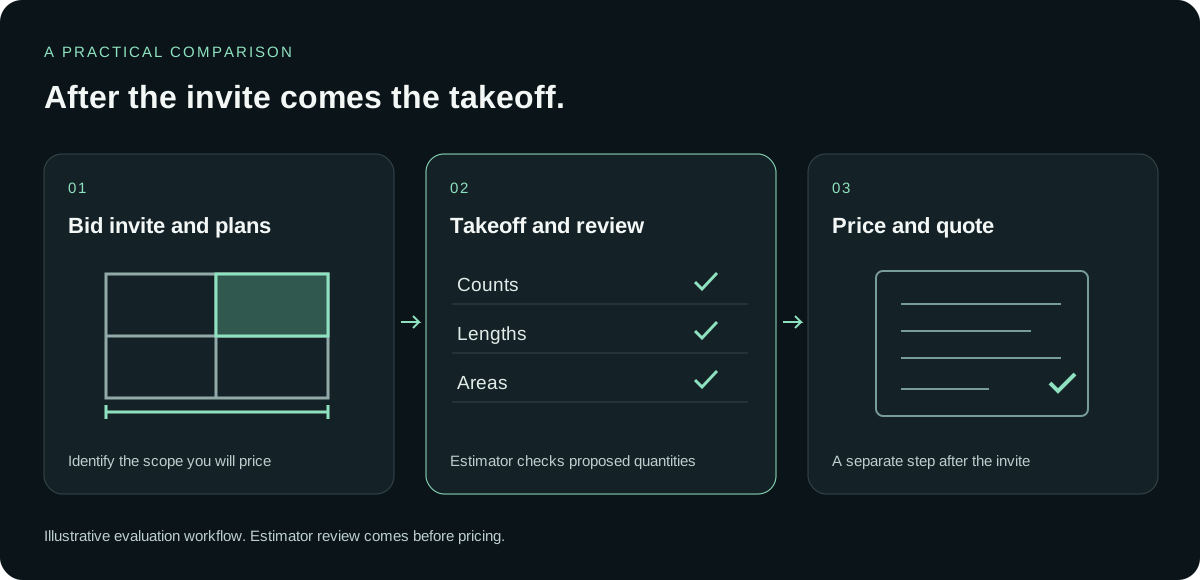
An invitation is the start of a possible estimate. Before measuring, decide which scope you intend to bid and which drawings belong to it. Keep the estimating task separate from deciding whether to pursue the opportunity. The four steps below describe the work after that decision.
Download the plan set from the invite
Open the drawings supplied with the invitation and read the requested scope. Confirm that you have what you need for the takeoff. A trade package tells you what is being requested; it does not supply the measured quantities for your price.
Run the takeoff
Measure the counts, lengths and areas required for that scope, or use an AI takeoff process to propose them. Compare candidate tools on the same drawings so that the test answers your estimating question.
Have your estimator review the quantities
Check the proposed quantities against the intended scope. Correct the items that need correction and reject the ones that do not belong. With RenderDraw, this acceptance decision comes before anything is priced.
Price them and send the quote
Use the reviewed quantities for pricing. In RenderDraw, reviewed rows hand off to pricing and visual CPQ for the quote. Confirm your supported trades and files in a free sample run before making a purchasing decision.
The AI drafts. Your estimator decides.
For an incoming invitation, the estimator still needs to decide what is ready to price. RenderDraw’s AI proposes quantities from the plan set; your estimator accepts, corrects or rejects them. The invitation tool can serve its own job while the reviewed quantities move through pricing and visual CPQ.
Review before pricing
Only accepted quantities move on to pricing.
Uncertain items need a decision
Your estimator makes the call during review.
Your estimator stays in control
Accept, correct or reject the AI’s proposals.
From takeoff to quote
Reviewed quantities flow into pricing and visual CPQ.
Questions estimators ask
What is Downtobid?
Per its site, AI construction bidding software that identifies trade packages from plan sets, drafts scope notes and sends personalized invites to bid from a GC’s email. It also has a bid board for subcontractors.
How much does Downtobid cost?
As listed on its site on November 11, 2026: from $149/month for a GC organization, a subcontractor leads bid board from $119/month, and full bid management from $299/month. Subs can submit bids free. Confirm current pricing with Downtobid.
Does Downtobid do quantity takeoff?
Its site describes scope and package detection for invites, not quantity takeoff. Use a takeoff tool for quantities.
What do subcontractors use after a Downtobid invite?
A takeoff and estimating tool to measure the plan set and price the bid. RenderDraw does AI takeoff with estimator review and a handoff to pricing.
Is RenderDraw a bid-invite platform?
No. RenderDraw is AI takeoff, estimator review, a pricing handoff and visual CPQ.
See what the AI reads on your own drawings.
Send one representative plan set. RenderDraw reviews it and follows up with what the AI extracted and what it flagged for review. No obligation.
- Send the drawings and the scope to test.
- Review the AI-proposed quantities with your estimator.
- Discuss pricing and visual CPQ in a demo.
Sources and further reading
Published vendor descriptions and prices, checked November 11, 2026. The table separates published facts from the workflow questions to test on your own drawings.
- Downtobid: invitations, bid board and pricing (checked November 11, 2026)
- zzTakeoff: features, trial and pricing (checked November 11, 2026)
- Mint Takeoff: measuring and local files (checked November 11, 2026)
- Mint Takeoff: price, free option and demos (checked November 11, 2026)
- Kreo: file types and takeoff (checked November 11, 2026)
- Kreo: plans, AI tiers and trial (checked November 11, 2026)
Prices change; confirm with each vendor.
Product names are trademarks of their owners. RenderDraw is not affiliated with or endorsed by them. Descriptions reflect each vendor’s public site as of November 11, 2026; confirm features and pricing with each vendor.