RenderDraw unifies your RFI, RFP, and takeoff process into a single, structured workflow. Respond to more opportunities, submit more accurate quotes, and move faster — without adding headcount.
AI quoting uses models, rules, and live business data to turn source documents into priced, reviewable quotes. In RenderDraw, AI reads drawings, CAD files, RFPs, and specifications, extracts the required quantities or requirements, matches them to approved knowledgebase records, applies current pricing, then routes the quote through human approval.
This workflow is built for teams that cannot risk black-box proposals. Every extracted quantity, selected answer, pricing lookup, and approval action can be traced back to the source document and the system that supplied the price.
| Query Intent | RenderDraw Page | What It Answers |
|---|---|---|
| takeoff AI | Takeoff Automation | How AI extracts quantities from drawings and CAD files. |
| takeoff quoting | Takeoff AI Quoting | How extracted quantities become priced bid workbooks. |
| RFP AI | RFP Automation | How AI parses requirements and drafts compliant responses. |
| RFP quoting | RFP AI Quoting | How RFP requirements connect to approved pricing and proposals. |
Every RenderDraw workflow is a visual graph of typed blocks — ingest, AI reasoning, datasource lookups, human approval gates, and proposal delivery — running durably at enterprise scale.
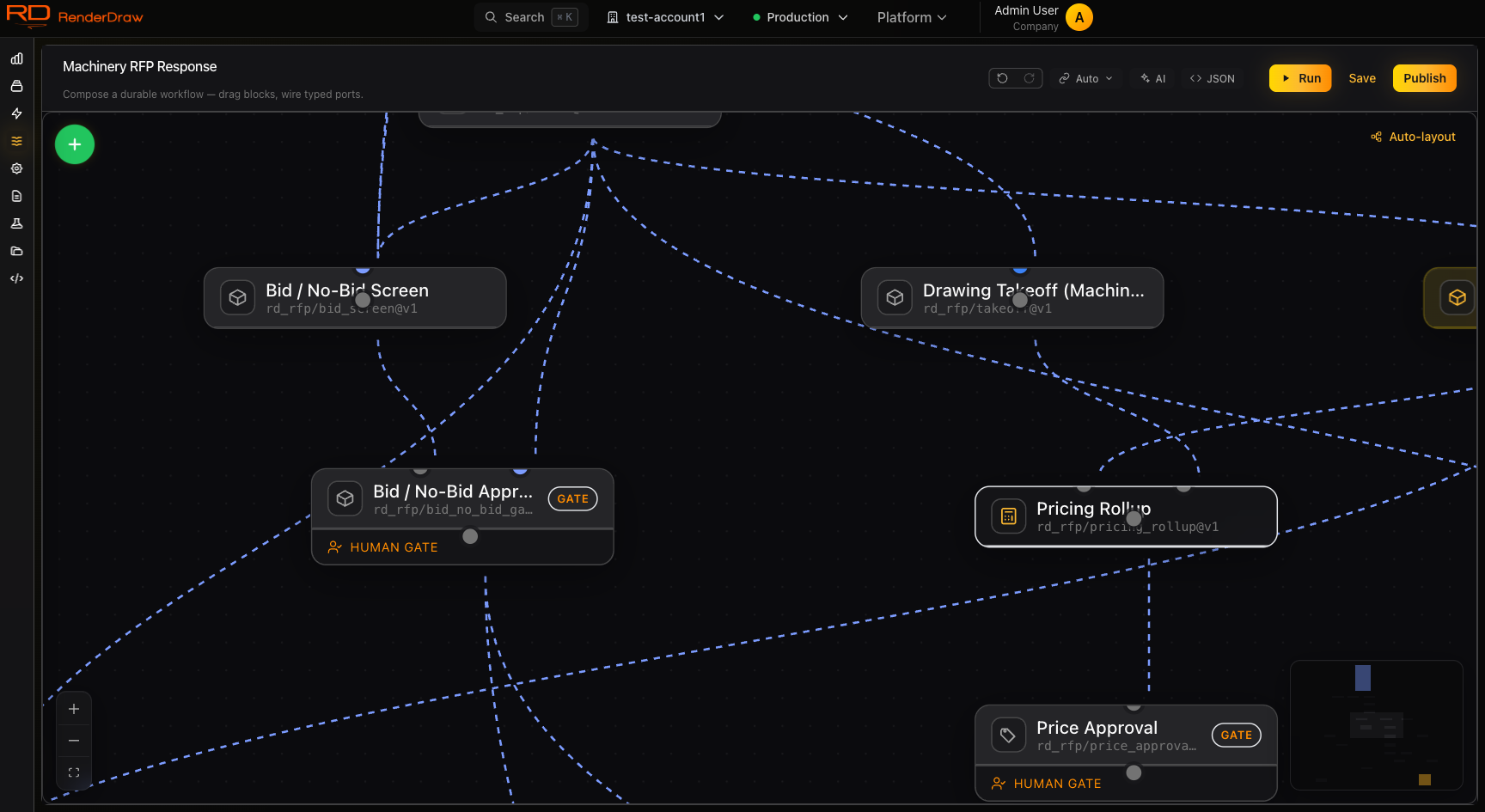
A live RFP-response workflow on the RenderDraw canvas — human gates and all.
Takeoffs, RFPs, and RFIs are the core of construction and manufacturing sales. RenderDraw connects all three — from raw drawings to signed proposals — in a single structured workflow.
AI-vision extraction from 2D drawings. Automatically count, measure, and price materials directly from submitted PDFs and CAD files. No manual measurement.
Turn weeks of proposal writing into hours. AI reads the RFP, pulls context from your knowledgebase, and assembles compliant responses with accurate pricing automatically.
Track, route, and auto-respond to Requests for Information. AI drafts responses from your knowledgebase, routes for human approval, and closes the loop automatically.
Every workflow is built from composable blocks — AI reasoning, CAD conversion, datasource queries, human approval gates, proposal generation. Drag, configure, connect.
Block types include AI context blocks (Claude, OpenAI, Gemini, and custom endpoints), CAD conversion blocks (30+ formats to GLB/GLTF), datasource blocks (Salesforce, SAP, spreadsheets), configurator blocks, pricing blocks, and proposal blocks (Conga, DocuSign, PDF).
Browse All Block TypesEmail / SharePoint / Salesforce trigger
Extract requirements, specs, deadlines
Match requirements to past responses
Salesforce CPQ / Logik / internal ERP
Estimator reviews before submission
Conga / PDF / DocuSign delivery
Feed RenderDraw your past proposals, product specs, pricing sheets, CAD drawings, and internal guidelines. Every workflow can query this knowledge at runtime — so your AI responses always reflect your actual data, not a hallucination.
context.query({
knowledgebase: "rfp-library-2024",
query: "steel beam load specs for
warehouse projects >50k sqft",
topK: 5,
includeSource: true
})
Match found: 3 prior proposals with identical spec range. Pre-filling pricing from 2024 Q3 submission.
Different workflow steps demand different models. Complex reasoning for RFP parsing, fast extraction for takeoffs, structured generation for proposals. Configure each block independently.
Best for RFP analysis, contract review, and ambiguous requirement extraction. Long context window handles 200-page tender documents.
Learn More →Multimodal vision for reading 2D drawings, extracting dimensions, and identifying components from scanned plans. Powers takeoff automation.
Learn More →Mix providers within a single workflow. Use a vision-capable model for drawing analysis, a long-context model for drafting, and a custom endpoint for domain-specific scoring.
Learn More →Workbooks are structured data containers that live inside RenderDraw. They sync bidirectionally with your ERP, CRM, and legacy spreadsheets — so the estimating team always works from a single source of truth.
Map columns from Excel uploads to structured fields. Workflows populate workbooks automatically as they run — pricing from Salesforce, materials from your catalog, labor rates from your ERP.
Every workflow block has a provider. Salesforce, SAP, Microsoft 365, Procore, Autodesk, and more. No custom code required.
When estimating runs on a unified, structured workflow, the result is compounding: each quote is faster to produce, each response is more accurate, and each project starts with better data. That compounds into more bids submitted, fewer errors, and a higher win rate.
RenderDraw connects every stage — from the first drawing to the signed proposal — in a single auditable pipeline. You see exactly where each quote stands and where time is being spent.
See It in ActionEach section below is a deep-dive into one part of the workflow platform. Start with what matters most to your team.
Connect a knowledgebase, configure an AI block, and run a workflow against a real document. Your first takeoff, RFP, or RFI response — no professional services required.