
What is a Salesforce Product Configurator?
A Salesforce product configurator lets users customize products in a Salesforce-centered workflow. Depending on the architecture, the visual experience may be embedded in Salesforce or connected through an integration. Sales reps and customers can review options, variants, and accessories before an approved quote handoff.
Traditional Salesforce CPQ handles the "Configure, Price, Quote" workflow through text-based selection. But for complex, highly-configurable products—machinery, furniture, electronics, vehicles—text alone isn't enough. Users need to see what they're building.
RenderDraw can add a visual layer to a Salesforce-centered quote workflow. Configured rules and visual review can help teams catch some invalid combinations earlier; results depend on rule coverage, source-data quality, integration design, and process adoption.
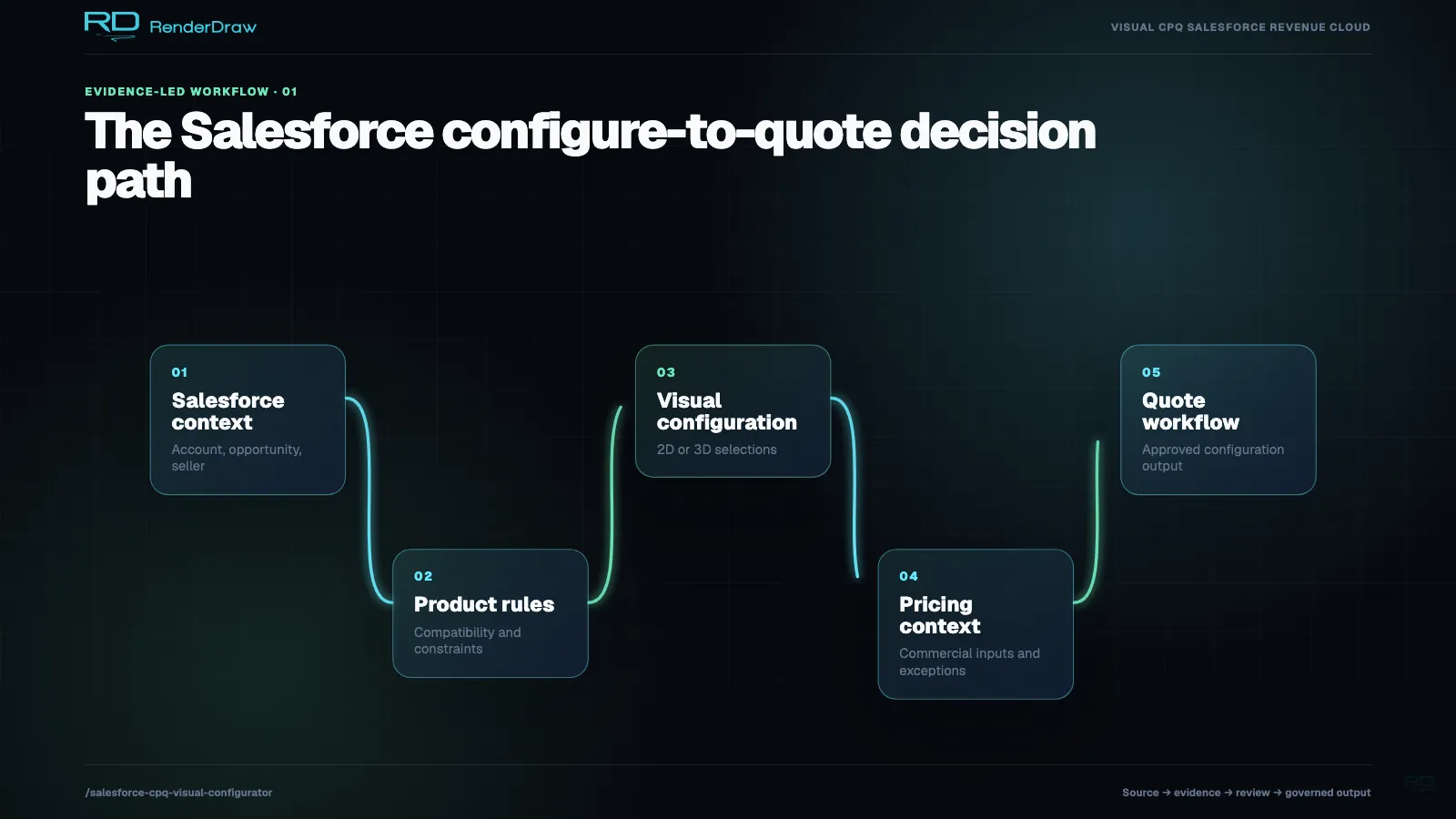
Illustrative configure-to-quote flow
Keep CRM context visible through review and output.
This conceptual flow shows how account and opportunity context can connect product rules, visual configuration, pricing, approval, and quote output. Salesforce objects and write boundaries vary by implementation.
Read the video transcript
This diagram starts with Salesforce account and opportunity context, then connects product rules to the visual configuration experience. The configuration state carries into pricing and exception review instead of becoming a disconnected image. A named approval boundary controls which selections and commercial decisions are written back into the quote workflow and downstream Salesforce record.
Illustrative evaluation example
From product option to approved quote line
Use this sample industrial enclosure to discuss the handoff. All option codes, dimensions, rules, and output values below are hypothetical. This is an acceptance scenario, not a customer implementation, product screenshot, or measured result.
Step 1
Select the options
Choose enclosure ENC-800, width 800 mm, a left-hinged door, and cooling option COOL-01. Keep the opportunity reference and product revision with the configuration.
Step 2
Apply the approved rule
For this sample, cooling requires at least 800 mm width. A 600 mm enclosure with cooling must show an explained conflict and remain in review rather than proceed to quote handoff.
Step 3
Review the visual state
Inspect the enclosure width, door swing, and cooling placement. A reviewer checks that the visible selections match the accepted options. Engineering reviews clearances and requirements beyond the modeled rules.
Step 4
Approve the mapped output
Only after required review, pass the accepted product/options, quantities, and configuration revision to the agreed quote mapping. Validate pricing in the designated pricing system and route any exception through its approval process.
Illustrative approved quote handoff
These are business labels, not universal Salesforce API fields. The base item, option lines, and attributes below must be mapped to the objects used by your implementation.
- Base product / quantity
- ENC-800 / 1
- Approved option / quantity
- COOL-01 / 1
- Configured attributes
- Width: 800 mm; door: left-hinged
- Configuration reference
- Sample CFG-001, revision A
- Review state
- Approved configuration; quote approvals remain separate
- Pricing / record output
- Resolve the approved price book and pricing rules; verify saved quote lines against the configuration
Permission boundary to validate: visual review does not grant quote-write access. Identify the authorized user or integration identity, permitted objects and fields, and the action that submits the approved payload. Test denied writes, validation failures, and retries in a sandbox, including protection against duplicate option lines.
Bring these requirements to an evaluation
- A representative product revision, supported visual assets, option catalog, and an engineering-approved invalid combination.
- Your actual Salesforce product and quoting setup, destination objects/fields, pricing owner, and required approval states.
- Expected sandbox quote lines or workbook output, including product identifiers, quantities, attributes, and revision linkage.
- A permitted writer and a user who must be denied; expected behavior for a failed write, a retry, and a product change after approval.
- Desktop and mobile review tasks, pass/fail criteria, and a documented baseline for any time or rework measurement.
Visual Configurator Features
Capabilities to validate against your catalog, Salesforce architecture, and review process
3D Product Visualization
Transform static product catalogs into interactive 3D models. Customers see exactly what they're configuring in real-time.
Visual Configuration Rules
Define product rules visually. Hide incompatible options, show dependencies, and guide customers through complex configurations.
Real-Time Pricing
Pricing displays can update as configurations change using approved rules and data, with exceptions routed for review.
Salesforce-Centered Deployment
Support Salesforce-centered workflows while defining the objects, integrations, data boundaries, and security model for the selected implementation.
Drag-and-Drop Setup
Admins and implementation teams can prepare supported assets and visual rules; coding, data preparation, and delivery effort depend on scope.
Quote Line Integration
Map approved configuration state to CPQ quote data using implementation-specific objects, rules, and write boundaries.
Why Add Visual Configuration to Salesforce CPQ?
Measure median stage time against a documented baseline
Track invalid combinations, exceptions, and post-quote changes
Test whether visual context reduces clarification during review
Measure compatible option mix without assuming a revenue outcome
Salesforce Surfaces to Validate
Confirm the required products, objects, permissions, integrations, and data boundaries during discovery
Salesforce CPQ
Validate quote-line, pricing-rule, and approval mappings
Sales Cloud
Evaluate the opportunity and account context required by the workflow
Revenue Cloud
Confirm required product, pricing, subscription, and usage workflows
Experience Cloud
Evaluate authenticated portal and customer configuration requirements
Service Cloud
Validate asset, case, and field-service data boundaries
Commerce Cloud
Confirm storefront, catalog, pricing, and cart integration needs
How RenderDraw Works with Salesforce CPQ
Prepare Product Assets
Evaluate supported source formats, optimization needs, materials, and interaction requirements before publication.
Configure Rules
Define which options are compatible, set up visual variants, and create configuration logic.
Validate Quote Mapping
Reconcile approved configuration options with the target quote fields, pricing owner, and authorized writer in a sandbox.
Accept the Workflow
Test visual review, permissions, failed writes, and approval changes before agreeing on deployment scope.
Frequently Asked Questions
Common questions about Salesforce product configurators